
SAFETY TURTLE ALARM SYSTEM
Integrator Base Station
& Operation of Secondary Alarm
| Safety Turtles Home |
| Product Design |
| Ease of Use |
| Home Alarm Systems |
| Man Overboard Alarm |
| Integrator Base Staion |
Click for enlargements
- In order to use Safety Turtle® with a home
alarm system or with a Secondary
Alarm (Transmitter,
Receiver
and Horn)
supplied by Terrapin, an Integrator
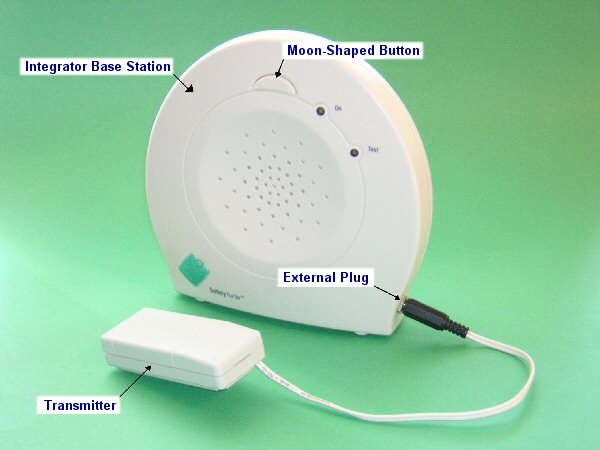
Base Station is required. The Integrator Base Station looks like
a regular Base Station, except for an external plug on the side of the
Base Station, into which a Transmitter can be plugged.
- The Integrator Base Station functions with Turtles in the exact same
way as a regular Base Station. Read the Safety
Turtle® User Guide(PDF) and perform the set up of the Integrator
Base Station to ensure complete coverage of the fresh water hazard(s).
If working with a shoreline, read Using
Safety Turtle With Fresh Water Shorelines.
- If located outdoors, a Terrapin
Carrying Bag is required to protect the Integrator Base Station
from water and dirt intrusion, direct sun and extreme cold. A Carrying
Bag is included with the Secondary Alarm.
- The home alarm / Secondary Alarm will not alert you
if the Integrator Base Station loses power. The Integrator Base does
not have internal battery back up. The alarm will not
sound if the green light on the Integrator Base Station is not on.
- The
audio jack on the Transmitter must be fully inserted into Integrator
Base Station plug. Any connection to your home alarm system should be
performed by your alarm company. (Instructions for the home alarm company
are included.)
- When properly connected to your home alarm or to a Terrapin supplied
Secondary Alarm, secondary alarming will begin immediately after the
Integrator Base Station starts alarming. Pressing the moon-shaped
button on the Integrator Base Station will stop secondary alarming
entirely. However, the Integrator Base Station will continue to alarm
at a lower volume until the Turtle is dry.
- Removing the Transmitter from your Integrator Base Station will activate
your home alarm / Secondary Alarm. Before intentionally removing the
Transmitter from your Integrator Base Station (e.g., to take Safety
Turtle away from home), disarm this function of your home alarm or unplug
the power cord of the Terrapin supplied Secondary Alarm. When the Transmitter
is removed from the Integrator Base, the
black plug should be put on immediately, so that there is no drain
on its battery.
Operation of Secondary Alarm
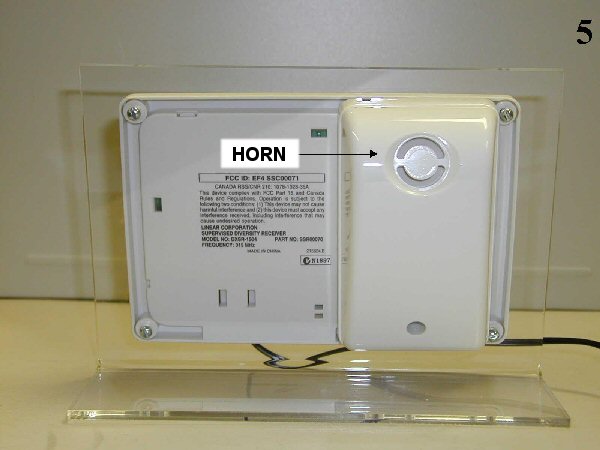
Before proceeding, read the accompanying instructions for the Integrator Base Station. The Secondary Alarm must be installed after the Integrator Base Station has been tested at its permanent location.The Secondary Alarm has three components: Transmitter, Receiver and Horn .
Secondary Alarm Set Up
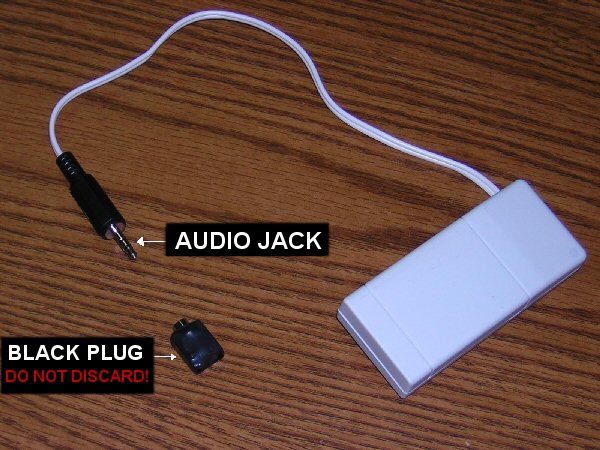
- Remove the black plug on the end of the Transmitter, exposing
an audio jack . Do not lose this plug. Connect the Transmitter to
the Integrator Base Station by inserting the audio jack fully into the
Integrator Base Station plug. Place the Transmitter in the basket at
the back of the Integrator Base Station. When you remove the Transmitter
from the Integrator Base Station, immediately put the black plug back
on (or cover the jack with aluminum foil to short the leads). This will
silence the Horn. Failure to take this step will drain the Transmitter's
battery.
- Locate the Receiver/Horn [Plexiglas stand] at waist level or higher,
indoors, and without electrical obstructions between it and the Integrator
Base Station. Plug in its wall AC adapter. Raise the two antennas of
the Receiver vertically. The AC adapter cord is NOT removable from the
Receiver/Horn - do not pull on it.
- Test your system in ACTIVE MODE (only the green light on the Integrator
Base Station should be lit) by partly immersing the Turtle in water,
which will set off the Integrator Base Station. Coincidentally, the
ALARM light on the Receiver
will illuminate and the Horn will sound. To silence the Horn, press
the moon-shaped button on the Integrator Base Station. Do not unplug
the Receiver/Horn while the Horn is alarming - if you do, see 7 below.
- The above steps must be repeated if the Receiver/Horn is relocated.
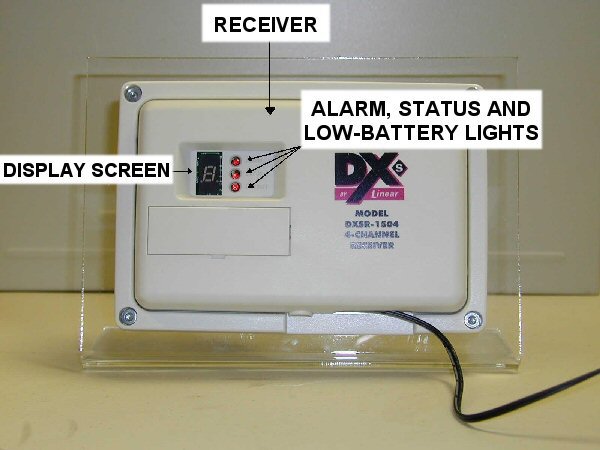
- The STATUS and LOW BATTERY lights on the Receiver identify faults.
If either light is lit, corrective action [see 6 below] may be required.
- Troubleshooting
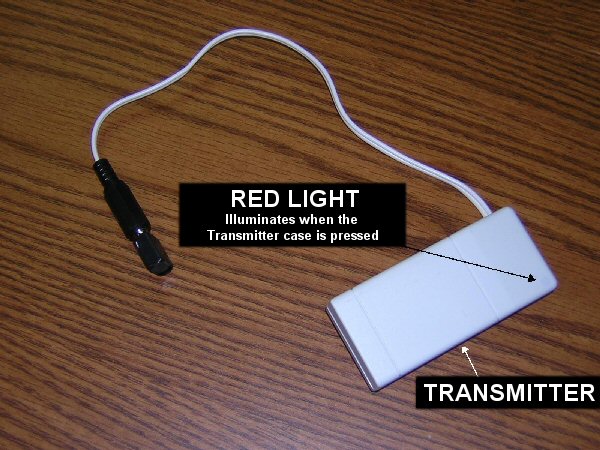
NOTE: Every hour, the Transmitter sends a status signal to the Receiver. The hourly signal updates the Receiver to the Transmitter's condition. A status signal will also be sent when you press on the case of the Transmitter, turning on its red light . These status signals allow the Receiver to determine whether or not a Transmitter has a low battery or has been removed from the system.- STATUS light is blinking: [Blinking will occur for up to one hour each time Receiver/Horn is plugged in or AC power is restored. This does not indicate a fault. The following applies only when Status light comes on well after power up.] This indicates that the Transmitter is not responding. This could be due to a line of site obstruction, an electrical interference, or someone having moved the Integrator Base. Repeat set up steps in 3 above. NOTE: The Status light will turn off when either an alarm signal or a status signal is received.
- LOW BATTERY light is blinking: The batteries in the Transmitter
need to be replaced. Normal alarming will still occur while LOW BATTERY
light is on. (A pair of CR2032 3 volt batteries are required. Call
Terrapin at 1-800-368-8121 for instructions on how to replace.)
- ALARM light on the Receiver is flashing and the Horn is sounding, but the Integrator Base is not alarming: Check that the Transmitter is properly inserted into the Integrator Base Station. When the Transmitter has been properly inserted, the Horn should stop alarming. NOTE: As a fail-safe feature, the Horn will sound if the Transmitter is removed from the Integrator Base. Before intentionally removing the Transmitter from the Integrator Base Station, unplug the Receiver/Horn's wall adaptor. Do not unplug the Receiver/Horn while the Horn is alarming - if you do, see 7.
Contact manufacturer about any other problems. Do not disassemble Transmitter, Receiver or Horn.
- Horn won't Turn Off
If the Horn sounds when you plug in the Receiver/Horn wall adaptor even though the Integrator Base Station is not alarming and the Transmitter is properly inserted, press the case of the Transmitter, turning on its red light . This will turn off the Horn. NOTE: This condition occurs if the Receiver/Horn has been unplugged while alarming.
- Transmitter Low Battery Test
Battery health is monitored hourly [see 6 above]. You can also test the Battery health by pressing the case of the Transmitter, turning on its red light. If the Transmitter battery is low, the Receiver's LOW BATTERY light will immediately turn on. To avoid very rapid battery depletion, reinsert the Transmitter into its black plug [or cover the jack with aluminum foil to short the leads] when the Transmitter has been removed from the Integrator Base Station.
- If you find it more convenient to mount the Receiver and Horn on
your wall, a wall-mounted unit can be ordered at 1-800-368-8121. Do
not remove the Receiver and Horn from your Plexiglass stand.
- A Receiver/Horn can work with up to four Integrator Base Stations.
Extra Transmitters [one per additional Integrator Base] must be purchased.
Each Transmitter must be tested separately [see 3 above] with other
Integrator Base Station(s) unplugged.
- NOTE: Each Transmitter is assigned a channel 1 to 4 in the Receiver. When a STATUS, LOW BATTERY or ALARM light is on, the display screen on the Receiver will indicate which Transmitter is reporting the alarm or fault
| User Guides (PDF) |
| Warranty & Service |
| Salt Water Pools |
| Fresh Water |
| Battery Pack and Travel Bag |
| Testimonial and Press |
Integrator Base Station S175 |
Integrator Base Station with |
Integrator Base with Transmitter $249 |
Integrator Base with 100 ft cable & horn $275 |
Integrator Base, transmitter & receiver $398 |
Integrator base, transmitter, receiver + horn on stand |
Additional Receiver + horn on stand $198 |